Every organisation has a legacy application that people depend on, that badly needs a refresh, and whose ageing technology makes that refresh hard to do. The instinct is to rebuild the interface on something modern.
Before committing to that, I wanted to check an assumption hiding inside it — that the answer to a bad interface is a better interface.
Because when you watch how these systems are actually used, much of it is looking things up. Which record is this. What changed. What is ending soon. Editing is a smaller share than it feels.
Those are questions. Not screens.
So I tried the other thing first: connect the old system to an AI assistant through an MCP server, and see what is left to build afterwards.
An addition, not a rewrite
The important part of the architecture is how little of it is new.
The MCP server sits beside the existing application and calls the endpoints it already exposes. The legacy UI carries on talking to those same endpoints. Nothing underneath changes — not the API, not the database, not a single line of backend code.
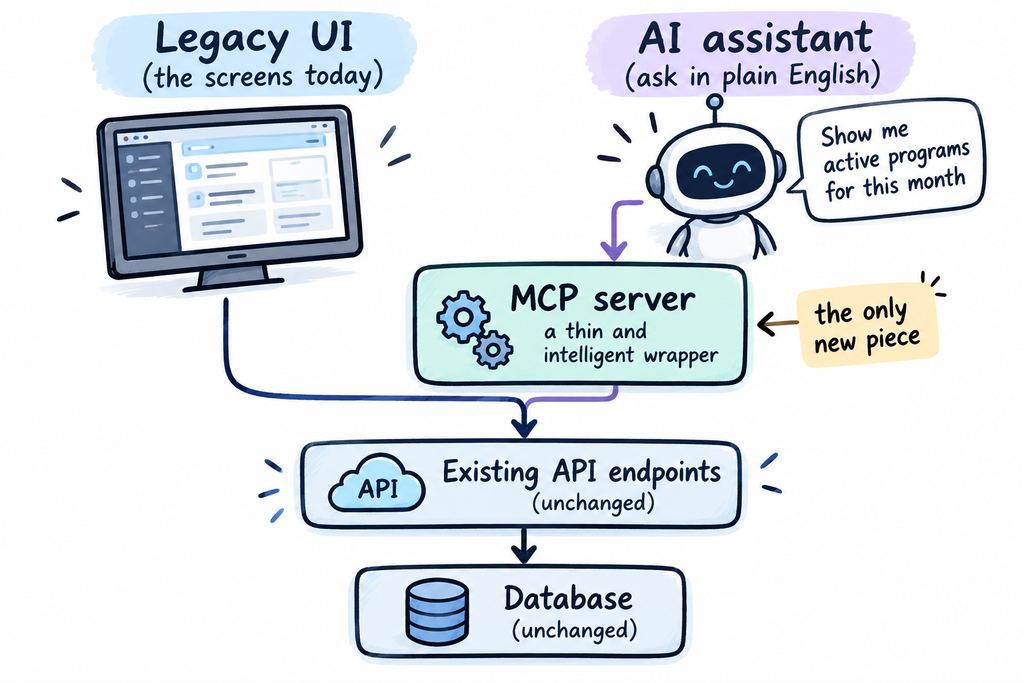
Both paths end at the same endpoints. The wrapper only calls them.
And there is a second-order benefit that took me a while to appreciate. Building an MCP server means building an AI layer. Any other system that needs this data — reporting, another service, a different tool — can connect through this standardized protocol. It makes the existing API future-proof.
You set out to answer questions and you end up with an integration point the system never had.
What you need before starting
Less than you would expect. No new infrastructure, and nothing asked of another team.
- An account with your normal access to the application
- Its API endpoints — documented, or recovered by watching the app run
- Python 3.10 or newer
- Claude Desktop, or another MCP-capable client
What you do not need: backend changes, new endpoints, or elevated permissions. The server reads exactly what your own login can already see.
The setup
A few minutes of plumbing. In Claude Desktop: Settings → Developer → Edit Config. Point it at your script, restart.
{
  "mcpServers": {
    "legacy-app": {
      "command": "/path/.venv/bin/python",
      "args": ["-m", "legacy_mcp.server"],
      "env": {
        "BASE_URL": "https://app/context",
        "SESSION":  "<session cookie>"
      }
    }
  }
}
I used a pasted session cookie. That is fine for research and unacceptable for anything permanent — a real deployment needs a service account or a proper token flow. Worth deciding early, because it is the thing most likely to stop this leaving your laptop.
Start with one endpoint, not the whole API
The temptation is to map everything first. Resist it. Pick a single endpoint and get one honest answer out of it — that teaches you more than a week of planning.
Choose one that is:
- Read-only, so nothing can go wrong while you are learning
- A list people already ask questions about, so the first answer is useful rather than academic
- Small enough to eyeball, so you can spot a wrong result rather than trusting it
# start here. one call, one shape.
rows = await api.get("records/list")
print(len(rows), rows[0].keys())
Once one endpoint works end to end, the rest is repetition.
A tool is a function plus a plain explanation
You write an ordinary function. Above it, in plain English, you explain what it does and when to use it. That text is what the AI assistant reads to decide whether to call it.
Write it for a new colleague, not for a compiler. Vague wording there is the most common reason a tool never gets used.
@mcp.tool()
def search_records(owner=None, status=None,
                   changed_since=None):
    """Search records by owner, status or
    when they last changed.

    The application shows one record at a
    time, so questions spanning many records
    cannot be answered there.
    """
    return store.query(owner, status, changed_since)
Most tools look like this. The hard part is the wording, not the code.
The advantage I did not expect
Every screen in every application is a guess about what people would want to know. The guesses that were right became features. The rest became exports to a spreadsheet.
A handful of tools does not need the guess. The AI assistant combines them to answer things nobody designed for:
- “Which of these has no owner, and what are they worth?”
- “What changed after the review, and by whom?”
- “What data are we storing that nobody ever looks at?”
That last one points somewhere uncomfortable. Every system accumulates fields that were added for a reason nobody remembers and are now maintained out of habit. Nobody builds a screen to surface that, because nobody would fund the ticket. But it is a two-minute question once the tools exist.
What it actually looks like
No interface. Just a question:
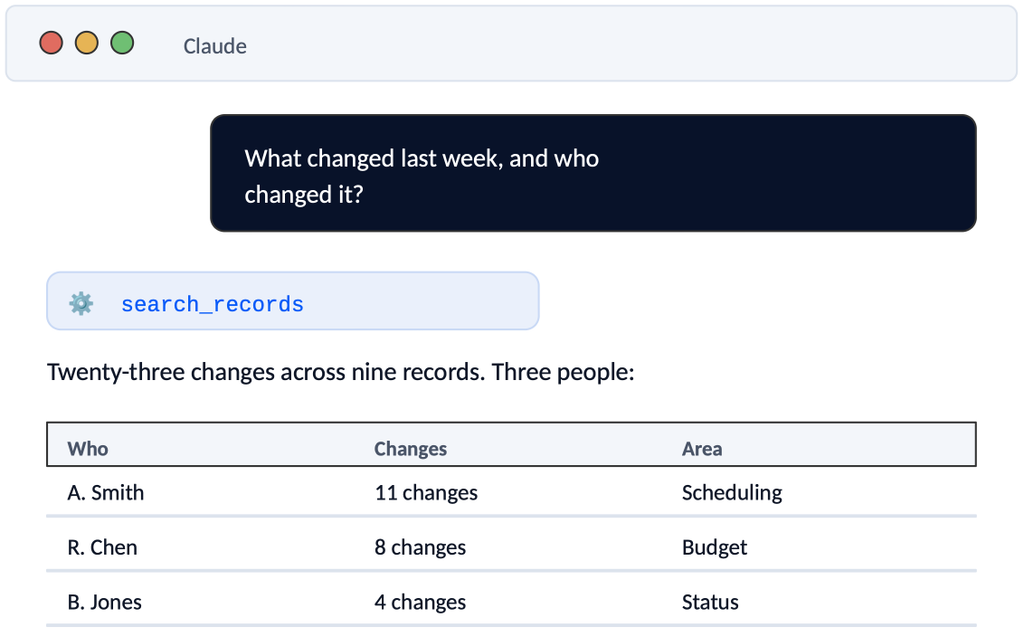
Most of it was scheduling. Two records were changed and then changed back the following day.
A question like that usually means exporting to a spreadsheet, because no screen was built to answer it.
So — do we need a UI?
It turns out to be a split, not a replacement.
Where asking wins:
- anything occasional,
- questions spanning many records,
- combining things no screen puts together,
- one-off analysis,
- checking whether something is set up correctly,
- finding data nobody maintains,
- questions you only ask once,
- the long tail nobody would fund a feature for.
Where screens win:
- work done the same way every day,
- entering and editing data,
- anything needing layout to make sense,
- tasks where being wrong is costly and you want the whole form in front of you.
I went in half-expecting to conclude that the interface was unnecessary. It is not. But it is smaller than I assumed, and differently shaped — fewer screens, built for the work people actually repeat, with everything else answerable by asking.
That changes what a rebuild costs. It also changes what you build first.
The research continues
I am not finished, and I would not trust anyone who said they were. What I have is a cheap way to test an expensive assumption before committing to it.
What comes next:
- Writes, not just reads. Everything above is read-only, which is the easy half. The moment an assistant can change data, the questions become about confirmation, reversibility and audit.
- Where the trust boundary sits. The server sees whatever your session sees. If access control lives in the old client rather than the backend, this route goes around it — and that is a compliance problem, not a technical one.
- Whether it holds up with other people. Everything here was tested by the person who built it. That is the weakest kind of evidence there is.
If you have a legacy application that is badly documented, this is worth trying before you scope the rewrite. You may be scoping the wrong thing.
I will post what I find.
Feel fre to download this research in a form of a playbook:

Leave a Reply