It starts with “just a quick question”
Every product and engineering team knows the pattern. Someone pings a chat thread with “I need a new ___”, “I have a problem with ___”, or “can you check the ___”. Then comes the back-and-forth: what exactly is broken, which environment, did it ever work, what did you already try. Halfway through, a second thread starts about the same issue. An hour later someone mentions the behavior changed after a release, which turns out to be the actual answer.
Most of that traffic is not really a new problem. It is a known problem, or a documented process, or a question that was answered in a release note three weeks ago. But the answer lives in a knowledge base nobody searches, and the question arrives in a channel nobody can audit.
What a support team actually needs is boring and structured:
- Service, request type, and impact level
- Symptoms, in the user’s words
- What has already been tried
- A description of the issue with steps and attachments
Chat threads almost never produce that. People do not withhold to process and structure. They do not know the service catalog, they do not know what “impact” means in your taxonomy, and asking a colleague is faster than learning a process.
The idea
Put an AI agent in front of the knowledge base you already have, and let it do the intake.
Not to replace people. To fill a gap most mid-sized organizations live with for years: there is no dedicated L1 tier, so business analysts, product owners, and developers absorb L1 work on top of their actual jobs. Hiring a support tier early is expensive and hard to justify when volume is uneven. Doing nothing means your most expensive people spend their mornings answering questions the documentation already covers.
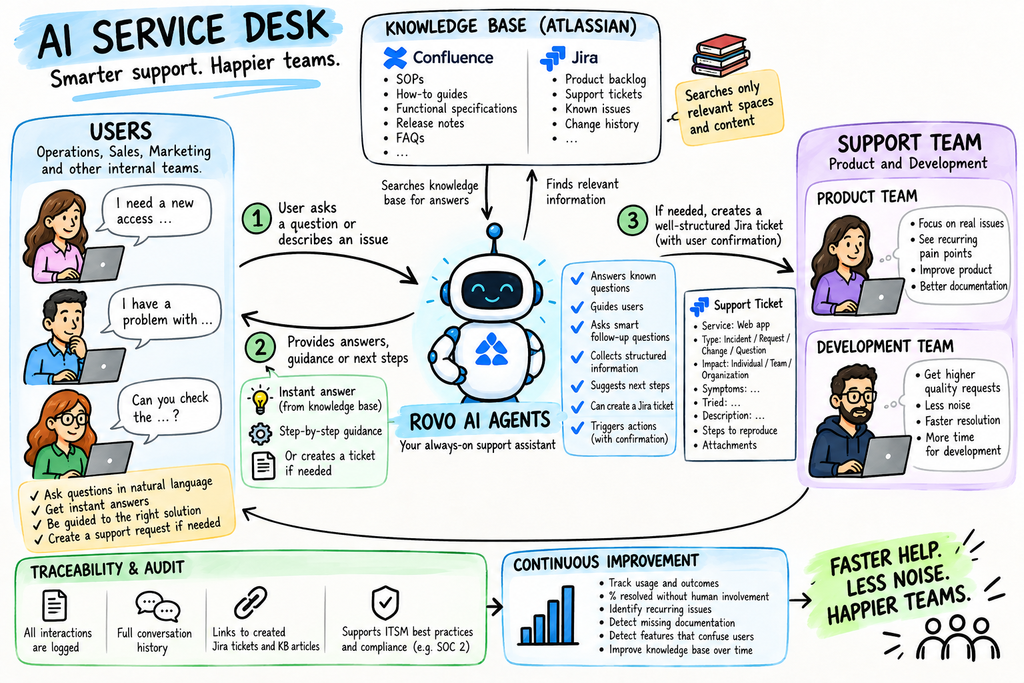
An AI front door sits in that gap. It guides the user, answers what is already documented, and when it cannot answer, it collects a properly structured request and hands it to a human. The value is not just the answers it gives. It is the quality of the questions it passes on.
What you probably already have
Most organizations running Atlassian are already sitting on the raw material:
- Confluence: SOPs, release notes, functional specifications, runbooks, onboarding pages
- Jira: product backlog, support tickets, historical resolutions
Rovo is the layer that reads both. The common reaction is “I already use Rovo chat, what’s new here?” The difference is scoping and instruction. A general assistant searches everything and answers vaguely. A configured agent is constrained: it reads only specific Confluence spaces and Jira projects, follows written instructions about how to behave in your support process, asks defined follow-up questions, and can take actions like creating a work item or raising a request. Custom agents can be built no-code in Rovo Studio, or with Forge when you need something more integrated.
How it works
The flow is simple enough to sketch on one slide:
- A user opens a chat interface (Rovo chat, the browser extension, or an embedded entry point in Confluence or Jira).
- The agent retrieves from the scoped knowledge base.
- It makes a triage decision. Either it answers, guides, and resolves in the conversation, or it escalates.
- On escalation, it creates a structured work item and forwards to L2. If L2 needs engineering, the same ticket moves to L3, so traceability is preserved end to end.
- Whatever gets resolved feeds back as a knowledge base update or a new article.
One design rule matters more than the rest: nothing is created automatically. Ticket creation and knowledge base edits require confirmation from the person in the conversation. The agent drafts, the human approves. That single constraint removes most of the risk and almost none of the benefit.
The four agents
Rather than one agent trying to do everything, split the job by audience and scope.
1. The front door (L1). Available to everyone internally, living in the support home space and the support Jira context. It triages, answers from the knowledge base, performs minimal structured intake, and escalates by creating a work item. Its KPI is the share of users who did not need to create a ticket at all after the interaction.
2. The triage copilot (L2). Built for the analysts and product owners who pick up escalations. It summarizes the incoming request, suggests classification and priority, proposes the next questions to ask, and surfaces related issues. It measures itself on escalations acknowledged within SLA and tickets triaged without extra clarification rounds.
3. The knowledge base curator. Watches escalations and repeat questions, then proposes and drafts knowledge base improvements. This is the agent that makes the system compound instead of plateau. Its KPI is the share of escalations that result in new or updated documentation.
4. The service catalog navigator. Helps users pick the right service, request type, and route without needing to understand internal team structures or terminology. It directly attacks misrouting. Its KPI is tickets reassigned due to wrong service selection.
Each agent should be scoped to the narrowest knowledge source that can do its job. A single well-structured space beats a broad messy one every time.
The upside
- Cheaper than premature hiring. You get an L1 function without an L1 headcount, and you learn what the real volume and shape of demand is before you hire.
- It enforces ITSM hygiene. To build the agents, you have to define services, request types, and impact levels. That work has value even if you turn the agents off.
- Escalations arrive usable. Engineering gets reproduction steps instead of “it’s broken again”.
- Everything is traceable. Requests stop dying in chat threads, and audit has a record.
- It compounds. Every resolved escalation is a documentation candidate, so answer coverage grows with use.
- It generates product signal. Recurring pain points, missing documentation, and features that repeatedly confuse users all become visible in a dashboard instead of anecdotes.
- No new platform for users. It lives where the work already happens.
Reasonable cross-agent measures: L1 deflection rate, escalation quality score (escalations accepted without rework), time from request to resolution, knowledge coverage ratio, and support load per analyst or developer, tracked as a trend rather than a target.
The downside, honestly
- The knowledge base is the ceiling. If your SOPs are stale, the agent will repeat stale information confidently and at scale. A documentation cleanup is a prerequisite, not a follow-up.
- Confident wrong answers. Retrieval reduces this, it does not eliminate it. Require citations to source pages, instruct the agent explicitly to say it does not know, and keep the human confirmation step on every write action.
- Permissions become visible. Agents only surface content the user could already access, which means any over-broad space permission you have been quietly living with is now easy to find. Audit space access before launch.
- Expectation creep. Users will immediately ask for live operational data: record statuses, report results, environment state. An agent grounded in Confluence and Jira cannot answer those without additional integrations. Set that boundary early or the first week will feel like a failure.
- It is a product, not a project. Instructions, scenarios, knowledge scoping, and catalog definitions need an owner and a maintenance cadence. Unowned agents rot faster than unowned documentation.
- Deflection is a gameable metric. “No ticket created” can mean the user was helped, or that they gave up and pinged someone directly. Always pair deflection with a re-contact or satisfaction measure.
- Adoption is the hard part. The habit of asking a person in chat is strong, and it works. Unless the people currently answering those messages start redirecting to the agent, you will run both systems at once and gain nothing.
- Vendor and licensing considerations. Agent capability is tied to your Atlassian plan tier and seat model, and agent definitions are not portable if you ever change service management platforms. Confirm what your plan includes before scoping.
- Friction on trivial requests. A guided intake with a confirmation step can feel slower than a one-line message for genuinely simple things. Keep the intake minimal, or people will route around it.
Where to start
Pick one service, one Confluence space, and one Jira project. Build the front door agent only. Run it with a small group for a few weeks and measure two things: how often it answered without escalation, and how often the escalations it produced needed rework. Add the triage copilot next, the curator once you have enough escalation history to learn from, and the catalog navigator once the catalog is actually defined.
If it works for one service, the same pattern scales across the organization. If it does not, you will have spent a few weeks and produced a cleaner knowledge base as a side effect.

Leave a Reply